Looking at the data in Google Cloud Bigtable usually means the cbt command-line tool, the Cloud Console, or a throwaway script. I wanted a proper desktop client, like the GUI tools that exist for Postgres or MySQL, and couldn't find a good one. So I built one: Bigtable Desktop, a small app for browsing and querying Bigtable data. It also has a built-in MCP server, so Claude Code can read the same data.
Public Repository: https://github.com/eveenendaal/bigtable-desktop
What it does
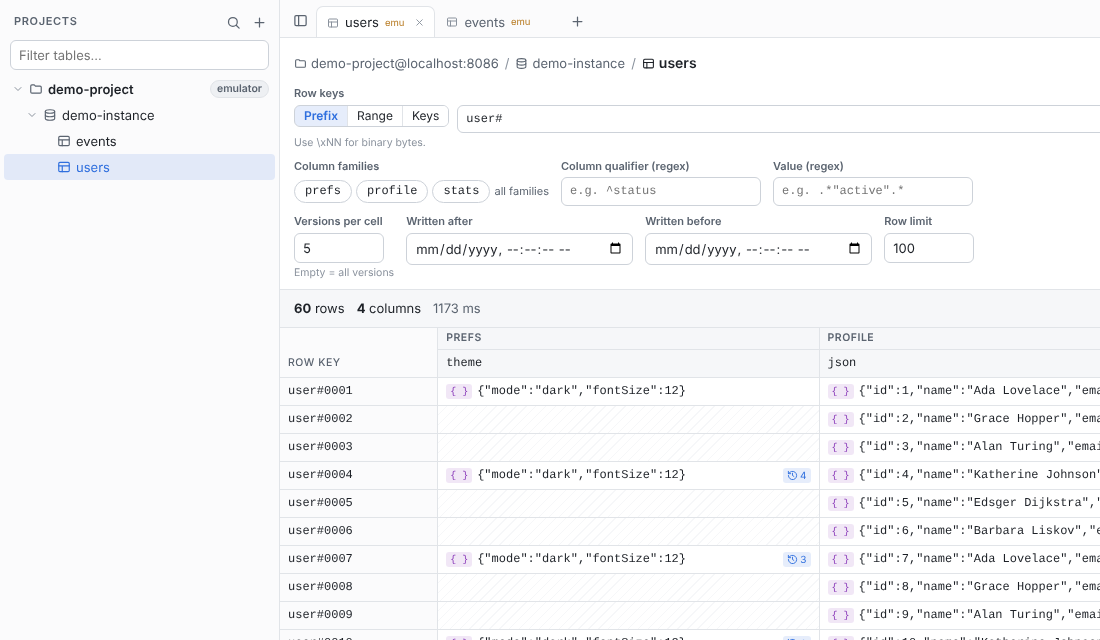
Bigtable Desktop is for using Bigtable, not administering it. It finds your projects, instances, clusters and tables, and lets you read the data in them. It never creates, changes or deletes anything, so it's safe to point at production.
- A tree of everything you can see. It discovers every project your credentials can see. Expand a project to see its instances, and an instance to see its clusters and tables. If your IAM roles let you read data but not list resources, you can add an instance or table by ID.
- Query tabs. Each table opens in its own tab, and each tab keeps its own query. Tabs, queries and settings are saved, so they're all back the next time you open the app.
- Rows mode reads by key prefix, key range or a list of exact keys. You can filter by column family, qualifier regex, value regex and write-time range, and choose how many versions to keep per cell. Load more pages through large scans.
- SQL mode runs GoogleSQL for Bigtable queries. Results go into the same grid.
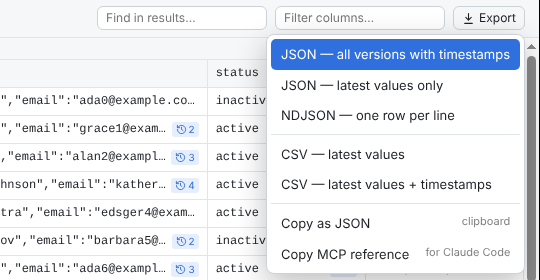
- Export to JSON, NDJSON or CSV, or copy to the clipboard. You can also export a single cell with its full history, or a whole row.
- A built-in MCP server gives Claude Code, or any other MCP client, read-only access to the same data. More on that below.
It also works with the Bigtable emulator, which is how I took these screenshots.
Built for JSON and versions
Two things bothered me most when reading Bigtable data by hand. Values are often JSON stored as raw bytes, and every cell can hold several timestamped versions. The app is built around both of them.
The grid marks JSON cells with { } and shows a ↺ count on cells that have older versions. Click a cell and the inspector opens. It shows the JSON pretty-printed with highlighting, as a collapsible tree, as raw text or as a hex dump. 8-byte counters are also decoded as 64-bit integers.
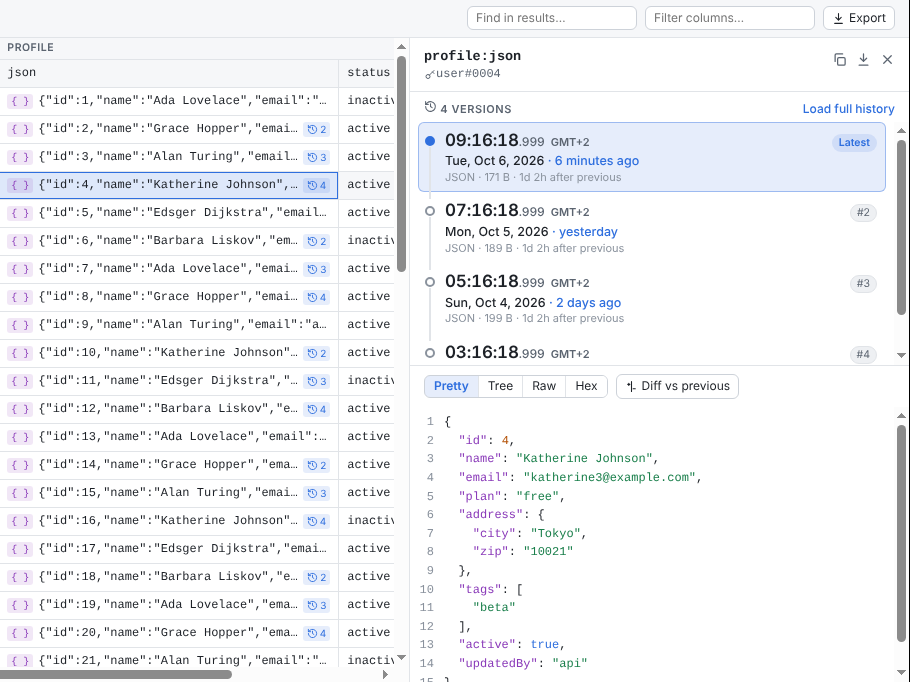
Bigtable timestamps are microseconds since the epoch, which is not something anyone can read at a glance. The inspector lays every version out on a timeline with the time, the date, how long ago it was written and the gap to the previous version. Hover a version to see the exact time down to the microsecond, and switch between local time and UTC at the bottom of the sidebar.
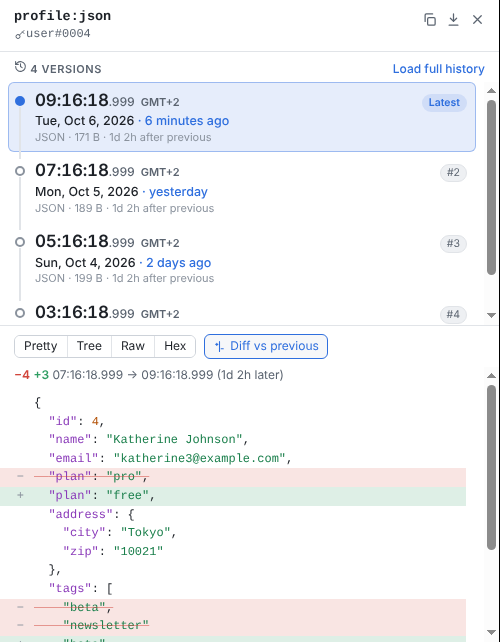
Diff vs previous compares a version line by line with the one before it, which makes it easy to see what actually changed between writes:
Using it from Claude Code
Once I had the data in front of me, the next thing I wanted was to ask questions about it. Bigtable Desktop includes an MCP server that gives Claude Code read-only access to Bigtable, using the same Google credentials, projects and saved queries as the app. It runs inside the app on http://localhost:8487/mcp for as long as the app is open, so there's nothing extra to install or launch.
Connecting it takes one click. Choose File → Connect to Claude Code…, or the plug button above the project list, and click Add to Claude Code. That runs claude mcp add for you at user scope, so the server is available in every project. The dialog also shows whether the server is running, lets you change the port if 8487 is already taken, and has the command to run yourself and a JSON configuration for other MCP clients.
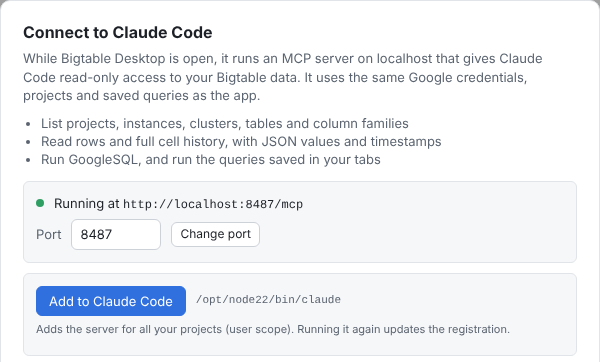
Because it's just a URL, you can also add it from a terminal:
claude mcp add --transport http --scope user bigtable-desktop http://localhost:8487/mcp
The server only listens on your own machine, and it refuses requests from web pages.
The server has tools to list projects, instances, clusters, tables and column families, read rows with the same filters as the app, read the full history of a cell, and run GoogleSQL. It can also list and run the queries saved in your tabs. JSON values come back already parsed, and every version has an ISO-8601 timestamp with microsecond precision.
The part I use most is Copy MCP reference in the Export menu. It saves a snapshot of the rows on screen, including any pages loaded with Load more and any full history you loaded, and copies a short reference to paste into Claude Code:
Bigtable Desktop query "users" (via the bigtable-desktop MCP server):
- Results I'm looking at: get_query_results {"id":"tab-users"} (60 rows, captured 2026-10-06T07:42:37.868Z)
- Re-run it: run_saved_query {"id":"tab-users"}
- Table: demo-project@localhost:8086 / demo-instance / users
- Query: prefix "user#" · 5 versions per cell · limit 100
Claude can fetch exactly what I'm looking at, or re-run the query for fresh data, without me describing the table or copying rows around. Like the app, every tool is read-only.
Installing it
On macOS, the repository is also a Homebrew tap:
brew tap eveenendaal/bigtable-desktop https://github.com/eveenendaal/bigtable-desktop
brew install --cask bigtable-desktop
brew upgrade quits the app if it's running and reopens it once the new version is installed.
The app connects with Application Default Credentials, so if you already use gcloud it's one command:
gcloud auth application-default login
For reading data you need roles/bigtable.reader. roles/bigtable.viewer also lets the app list instances and clusters, and roles/browser lets it discover projects.
How it's built
It's an Electron app on top of the official @google-cloud/bigtable Node.js client. The interface is plain JavaScript modules with no framework and no build step. Bigtable data has a few traps that the app handles carefully: values are read as raw bytes rather than decoded strings, and timestamps are never converted to JavaScript numbers, so microsecond precision is kept. The MCP server uses the official MCP SDK and runs in the app's main process over Streamable HTTP, so it shares the app's Bigtable code and reads its saved workspace. Tests run with Node's built-in test runner, and a set of integration tests runs against a local emulator.
Releases are built by GitHub Actions. Pushing a version tag builds the macOS installers, publishes a GitHub release and updates the Homebrew cask. Only macOS builds are published for now, but you can run it from source on Linux or Windows with npm install && npm start.
If you use Bigtable and have been missing a desktop client too, give it a try and let me know what you think.